Introduction: What Is an Assumed Breach Red Team Assessment?
Modern organizations increasingly recognize that perimeter security alone no longer provides an accurate picture of real-world risk. The assumed-breach approach starts from a more realistic premise — that an attacker already has a foothold inside the environment. This reflects today’s threat landscape, where “it is more likely that an organization has already been compromised, but just hasn’t discovered it yet.”
Instead of asking whether an attacker can get in, the focus shifts to how far they can move, what they can access, and how effectively the organization can detect and contain suspicious activity once the perimeter has been bypassed.
In this engagement, our goal was straightforward: if an attacker gained access to the development account, could they reach production within the same AWS Organization?
Starting with standard user permissions in the dev account, we traced the realistic paths an attacker would take — following exposed secrets, misconfigurations, and trust relationships. What emerged was a familiar pattern: individually minor issues that, when chained, created meaningful opportunities for privilege escalation and lateral movement. This summary captures what we attempted, what worked, what didn’t, and the defensive lessons that matter most for preventing similar real-world compromises.
The setup and our objective
Scope: an AWS Organization with separate dev and prod accounts. We were given user-level access in the dev account — no admin privileges, no prod credentials. Objective: reach resources in the production account and demonstrate the impact of any privilege escalations or misconfigurations we found.
We focused on discovery first: what shared services, code repositories, CI/CD integrations, and credentials were visible from dev? That’s where the useful breadcrumbs live.
What we tried (high level)
- Repository reconnaissance. We scanned the code and CI pipelines that were accessible from the dev account for secrets, tokens, or anything that might talk to other accounts.
- Infrastructure inspection. From the dev environment we looked for accessible servers, automation scripts, and baked AMIs that might be reused in production.
- Artifact & registry checks. We checked container registries and artifact storage referenced by dev pipelines for possible credentials or overly-broad permissions.
- Privilege escalation checks. On any machine we could reach, we inspected local configurations for insecure privilege settings and locally stored secrets.
- Cross-account access validation. If we obtained credentials or tokens, we verified whether they permitted API calls into other AWS accounts in the Organization.
Note: throughout we treated findings responsibly — we did not exfiltrate customer data or make destructive changes.
What worked — the chains that mattered
Several small issues, when chained, produced big impact:
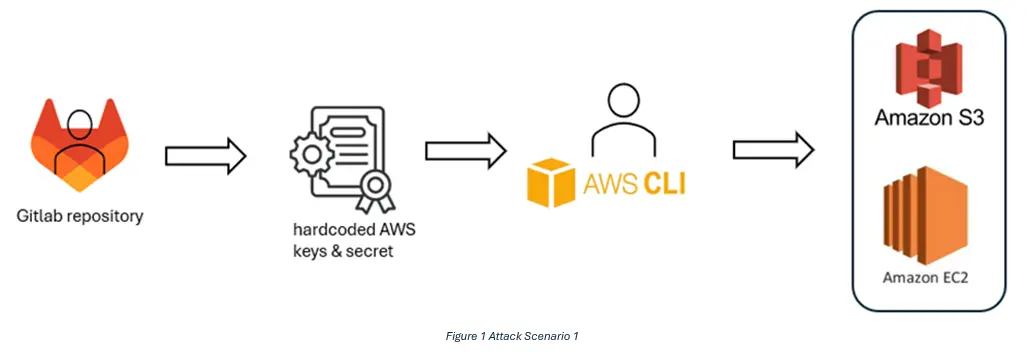
• Leaked long-lived AWS credentials in a repository: A set of AWS access keys committed into a repository accessible from dev allowed us to call AWS APIs. Those keys had enough privileges to enumerate and read resources in other accounts. This is the classic “one commit, unlimited impact” problem: secrets in code are readable by anyone with repository access.
• Hardcoded Docker registry auth on an EC2 instance: We found Docker auth stored on a dev EC2 instance. That credential allowed access to the private container registry that contained production images. Being able to download production images revealed sensitive configs and, where push permissions existed, creates a supply-chain risk.
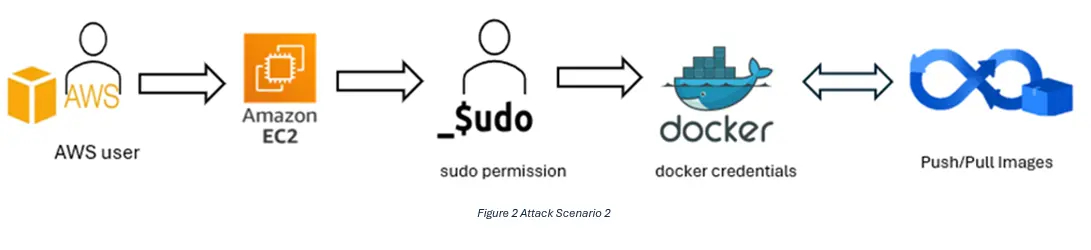
• Passwordless sudo: Several instances (including ones we could reach from dev tooling) allowed users to run sudo without a password. That meant any local account we could use could escalate to root on the machine with no additional authentication.
Chaining example (conceptual): exposed repo → obtain long-lived credentials → call AWS APIs to list cross-account roles/resources → use credentials found on an EC2 instance to access private registry → escalate to root on instance via passwordless sudo → pivot further.

What didn’t work (and why)
- Blind cross-account role assumption: Not every cross-account role was assumable from the dev keys. Properly configured cross-account IAM roles with strict trust policies blocked some lateral movement. Good role boundaries saved us time and limited exposure.
- MFA-protected console operations: Resources or consoles protected by enforced MFA remained inaccessible even with some credentials. Enforcing MFA for interactive sessions is an effective barrier.
These partial protections are signs that some controls were working — but the overall impact depended on other gaps in the environment.
The business impact
From a business perspective, the risk is threefold:
- Data confidentiality — ability to read production S3/RDS content or image layers containing secrets.
- Integrity & supply chain — ability to push or tamper with images can lead to backdoors being introduced into future releases.
- Availability — root access increases the chance of accidental or malicious outages.
Even a single misconfigured artifact or a short-lived secret can enable all three when combined with insecure host configurations.
Key recommendations (practical and prioritized)
- Remove secrets from code. Rotate any exposed keys immediately and shift repositories toward centralized secrets management such as AWS Secrets Manager, Parameter Store, or Vault to minimize blast radius.
- Adopt short-lived credentials. Prefer role assumption, OIDC, or AWS Identity Center over static keys. Ephemeral credentials significantly limit how far an attacker can move with a single compromised token.
- Harden instance configurations. Require passworded sudo at minimum, and ideally transition away from direct shell access by using SSM and tightly scoped IAM roles to reduce local misconfiguration risk.
- Enforce least privilege for registries. Use scoped deploy tokens and CI-only credentials. Ensure registry push operations are tightly controlled and fully auditable.
- Protect critical workloads. Enable termination protection on production instances and enforce this through launch templates and infrastructure-as-code guardrails to prevent unauthorized or accidental disruption.
- Automate detection. Integrate secret scanning into CI workflows and schedule regular configuration audits using tools like AWS Config, Inspector, or CIS checks to catch issues early.
- Practice the assumed-breach mindset. Incorporate this perspective into tabletop exercises and threat modeling to focus on the controls that effectively limit lateral movement and privilege escalation.
Final thoughts
The lesson here isn’t “eliminate every bug” — that’s impossible. The real task is to make sure small mistakes don’t chain together into catastrophic outcomes. The assumed-breach model is a powerful way to focus on those choke points — credential management, least privilege, and secure host practices — because they’re the controls that stop an attacker who already has a toe in the door.